Virtual Challenges Walk/Run/Cycle
A Funnel Analysis chart helps you understand how users navigate defined paths (“funnels”) within your product, and identify potential problem areas where users tend to drop off. A common example of a funnel is successful onboarding.
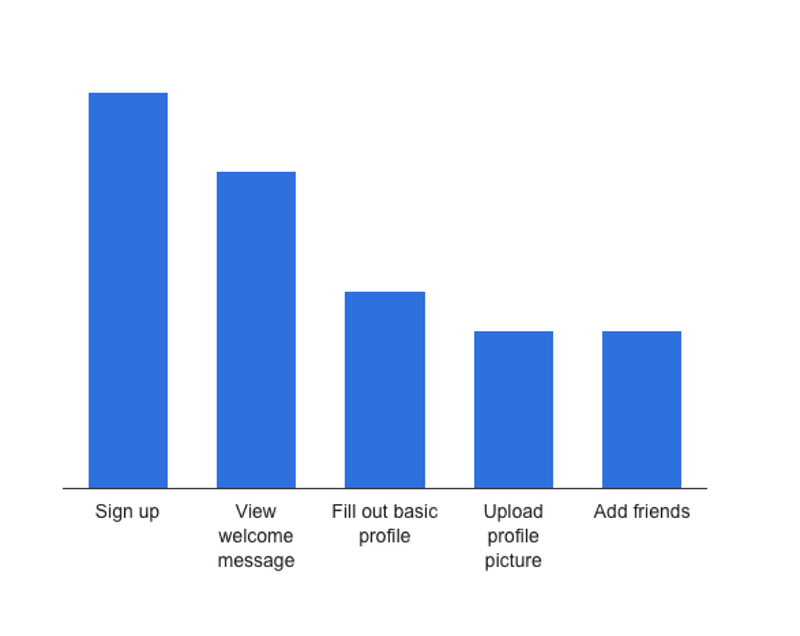
Virtual challenges have been booming for fitness apps since post-pandemic. This is independent of location, timings, geography, etc. One can choose a sport, read the distance goal, and join the challenge.
There are daily, monthly, and quarterly challenges.
Gamification of fitness with badges, rewards, and social-media sharing have been a hit improving the physical & mental health of fellow citizens. Apps like Fitbit, Strava, Garmin, Coros, Apple smartwatches, Fittr, and ultrahuman rings have transformed the fitness industry.
As a Product Manager building, delivering, and monitoring similar features for a diverse user group audience across age groups, fitness levels, etc measuring the success of this feature is not very easy. Defining a distance goal should not to too high for a beginner nor very easy for a moderate & elite audience. This takes a lot of trial & error approach with defining multiple challenges across social media days in a month.
Some of the considerable metrics & funnels are listed below:
Virtual Challenge-type Metrics
- Daily/Weekly/ Monthly Fitness Challenges (Run, Walk, Cycle)
- Minimum number of challenges a user participates in at any given time
- Total number of Challenges created — month-wise data
- Challenge Participation Ratio (Out of overall audience)
- Monthly Challenge Completion Rate
- Social media shares leading to join
User-behavior Virtual Challenges metrics
- New users joining Challenges
- Push Notification Open Rate
- Engagement Rate (Dates engaged) more than 20 days
- Average distance clocked per day (all 3 activities)
- User Satisfaction Score
- Number of Participants for Challenges vs Other Feature Users
- Total sessions created for Challenges
- Distance covered in all 3 activities
- Completion Rate
- Playstore review status
- Support tickets status
- Average session duration
- Session length
- Repeated Winners amongst all challenges
- What other features are winners (Top 5) of Challenges engaged in?
- The challenge location same as the current location in the profile
- Challenge location different to the current location in the profile
- Winner Vouchers Denomination vs Type of Challenge
- Vouchers distributed daily/weekly/fortnight monthly challenges
- Vouchers encashed daily/weekly/fortnight monthly challenges
Virtual Challenges Comparison Charts
- Funnel 1 | Interested (viewed the page) vs joined (registered)
- Funnel 2 | {D1, D7} progress vs inconsistent pattern {D1, D7}
- Funnel 3 | Inactivity patterns {W1, W4}
- Funnel 4 | Discontinued pattern in ‘x’ days of progress
- Funnel 5 | Discontinued pattern in no progress at all
- Funnel 6 | Discontinued in D1:D10 vs D11:D20 vs D21:D30
- Funnel 7 | Average days of progress in W1 vs W2 vs W3 W4
- Funnel 8 | No. of users who completed the challenge
- Funnel 9 | Pattern in active vs inactive days & vice versa
- Funnel 10 | No. of users completed the challenge before the time
- Funnel 11 | Early registrations (Coming Soon) who completed
- Funnel 12 | Early registrations vs Late registrations who completed
- Funnel 13 | Users who completed <5 challenges
- Funnel 13 | Users who participated in <5 challenges
- Funnel 14 | Gender ratio of challenge participation (male: female)
- Funnel 15 | Gender ratio of challenge completion (male: female)
- Funnel 16 | Average age group of users who registered Vs made progress Vs completed
- Funnel 17 | Completion rate across walk, run cycle
- Funnel 18 | Completion rate across the walk, run cycle wrt gender
- Funnel 18 | Completion rate success on what months of the year?
- Funnel 18 | Completion rate failure months Funnel 18 | Users most inactive months of challenges/ Least participation
- Funnel 18 | Location of walkers’ concentration wrt duration of the day
- Funnel 19 | Location of runners’ concentration wrt duration of the day
- Funnel 20 | Location of cyclists’ concentration wrt duration of the day
- Funnel 21 | Completed users with junior profiles (Parents Completions)
- Funnel 21 | Completed users with junior profiles (Male juniors vs Female juniors)
- Funnel 21 | Completed users with junior profiles across age groups (average parents’ age)
- Funnel 22 | Average distance clocked across walk, run, cycle in a challenge, gender-wise, location-wise
- Funnel 23 | Most engaging/format challenge of the year with the highest active users & distance clocked
- Funnel 24 | “Sum of distance” highest vs least in the year
- Funnel 25 | Vouchers created vs Unused
- Funnel 26 | Vouchers encashed vs Unused
- Funnel 27 | Users who joined a new challenge just after completing one
Emailers wrt Virtual Challenges Metrics to capture metrics
- Challenge Booking Confirmation
- Welcome Emailer
- Participation Reminder Delivery metrics
- Delivery rate
- Bounce rate
- Engagement metrics
- Click-to-Open Rate
- Read-Forward
- Conversion metrics
- Conversion Rate
- Revenue per Email
- Retention and Engagement Metrics
- Unsubscribe
- Complaints
- Behavioural Metrics
- Time Spent Reading Email
- Across devices
- Challenges Specific Date
- Churn Rate (overall)
 Prathima's Miles & Milestones
Leave a comment