A Parenting App — Ecommerce
Use case
Nestery is a one-stop shop for kids’ necessities. It serves a wide cohort — newborn to pre-teens category. It is e-commerce for parents to place orders that cater to their children’s needs.
Problem statement
New products get unnoticed. Work on the discoverability of the products & condensing the wide variety of categories.
Create a contextual, customized menu catering to various user personas from grandparents handling the app, a techie, a mom-dad, a nanny, a housewife, a working woman, & so on.
Solution
Let’s aim at re-designing the information architecture of the app referring to the current state for both web-based & native apps in the near future.
Assumptions made:
Unisex apparel like toys, gifts, play, and eat remains equivalent irrespective of the gender mentioned in the toddler’s profile.
Highlight the main issues
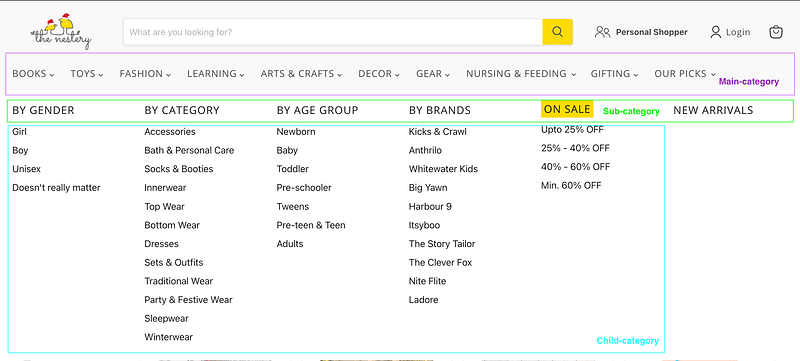
- The selected main category is not highlighted. Eg: Here it is Fashion.
- No visual cue for the user to identify the latest designs in the existing sub-categories & new products added in the same. Eg: Here it is New Arrivals
- No visual cue for the user to identify the most recently added child categories. Eg: Ladore.
Note: “NEW” in red fonts or an asterisk is the usual connotation for the cue. - The menu overall is cluttered with many items to scan for a new user.
- Too many options to choose from may lead to information bias & drop-offs leads to no orders.
A glimpse at possible solutions (Reference: A native app approach)
- Let’s say a parent/user chooses to create a profile for both toddlers — a daughter & a son. Goal: Catering to a specific gender without filters to skim across the available options.
- Let’s allow the parent/user to create a customized profile for both son & daughter with its customized homepage. And, of course, the cart is shared/single identity as its one parent profile. Goal: Keeping it relevant to the TG. (Target Audience)
- The demographics of every child are created during the registration & the parent can always switch between the customized home page of the son & daughter at any time by editing the profile. Goal: Personalized product recommendations.
- A strong reason for a customized homepage eliminates the necessity of avoiding common filters like gender, and age group, leaving more scope & visibility for child-category items as depicted in v1.0 above.
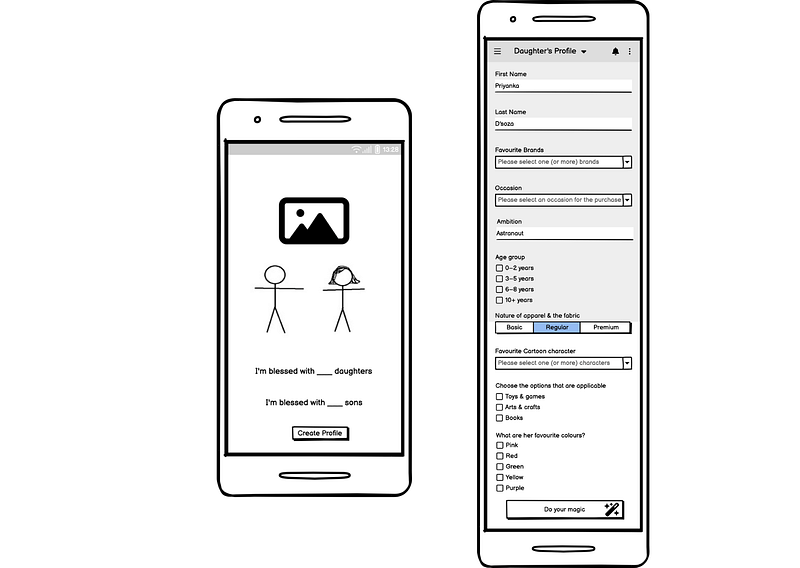
5. The various main categories referred to in v1.0 can be condensed into easy-to-remember, short adjectives representing the child’s necessities. Eg: Learn, dress, play, eat, decor, and gift respectively.
Note: The review & help sections refer to the parent for assessments.
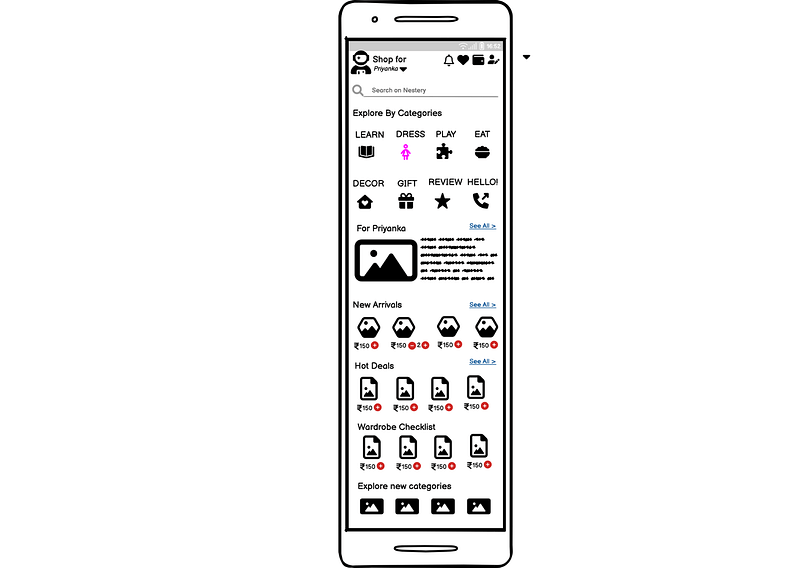
6. “For Priyanka”: This section is unique to every child and is derived from the toddler’s profile with the demographics.
Goal: Recommendation engine | This helps customers discover products that they may be interested in based on their past purchases or browsing history. You can also use it to suggest products to customers based on their child’s age.
7. On tapping on one of the main categories (A. Dress: highlighted in pink), it leads to the sub-categories (C). And, on tapping on one of the items, from subcategories like accessories, winterwear, etc, it leads to the individual item ie., the product description page as shown below in C.
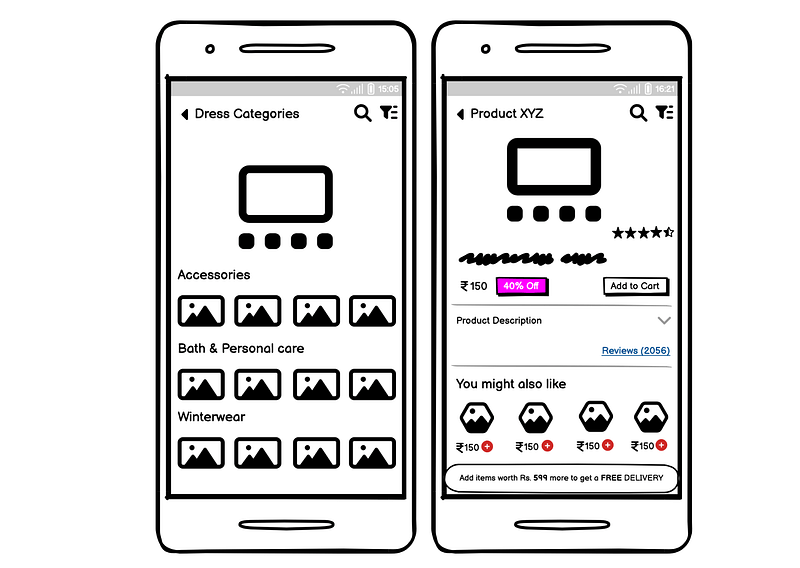
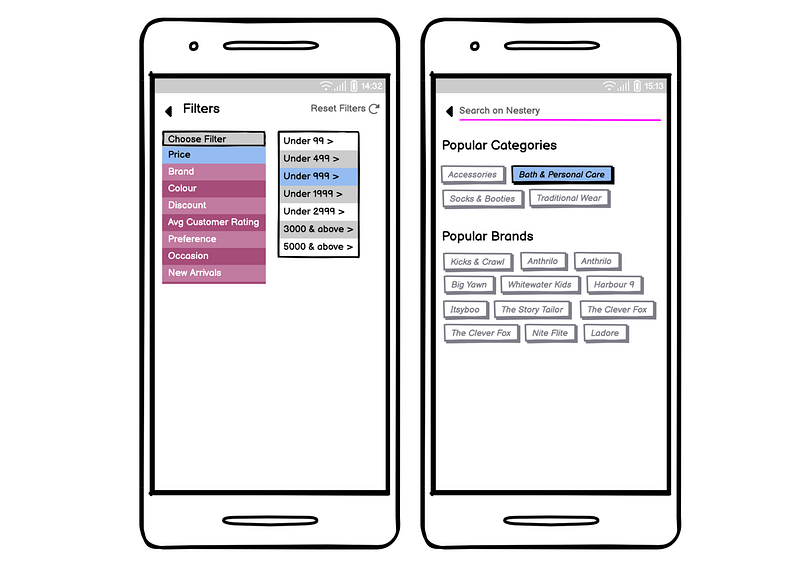
8. For ease of access, implement filters and sorting options. Users can use these to narrow down their search results and find products that meet their specific criteria, such as price & brand as shown below in D.
A few pointers as add-ons
- Using clear and descriptive product titles and descriptions: This makes it easier for customers to find the products they are looking for when they are searching or browsing.
- Using high-quality product images: This helps users get a better sense of what the product looks like and can help them make a purchasing decision.
- Utilize user reviews and ratings to help customers find age-appropriate products: You can allow users to rate and review products, and include this information on the product pages to help other customers make informed purchasing decisions.
- A strong recommendation engine: This can help users discover products that they may be interested in based on their past purchases or browsing history. You can also use it to suggest products to customers based on their child’s age set in the toddler’s profile.
- Utilize social media and other marketing channels to showcase your products and make them more discoverable to potential customers. You can also consider creating targeted ads based on the age of the child or specific parenting needs.
- Consider implementing a loyalty program or rewards system to encourage customers to continue using your app and discover new products.
- Market the app to newly married couples, those going through parental training, child psychology, & recent parents.
Overall, the key is to make it easy for customers/users/parents to find and purchase the products they are looking for, and to help them discover new products that may be of interest to them leading to mindful parenting & a memorable childhood for the kids in return.

P.S. Please do leave a comment with your opinion & suggestions, unbiased. Constructive criticism to improvise is always a welcome.
 Prathima's Miles & Milestones
Leave a comment