Problem statement
1. How many of us are aware of the calories in our favorite Masala dosa or Kaju Katli?
2. Are we aware of our daily calorie intake on a regular day & after an office party?
3. How I do break even if I want to burn fat & stay fit given the occasional cheat meal?
If your answers to the following questions result in a No, then you know the problem.
The app is built with an intention of educating Indians about the difference in calories resulting from cooking in various oils, and various types of rice, roti, etc for your optimal daily intake of meals.
Introduction
MyFitnessBuddy is a calorie-tracker app for you & your family.
A family that consumes healthy food, and follows a fitness regimen regularly is a happy family & leads a content life.
The app is designed very subtly so that irrespective of any age group, the meals can be input without any hassles.
(Tap on the image for a clear view)
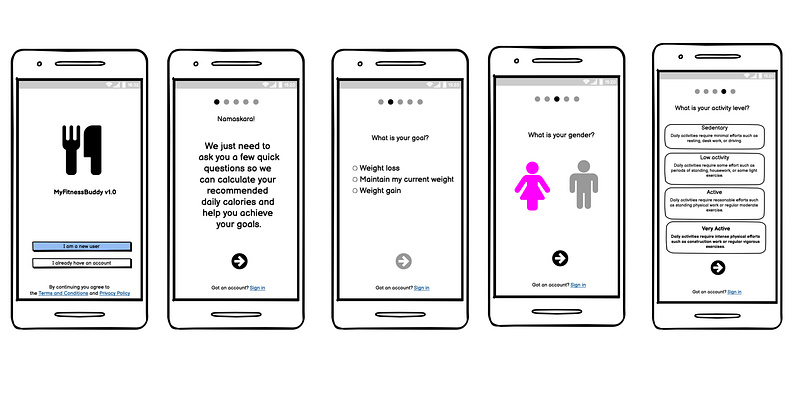
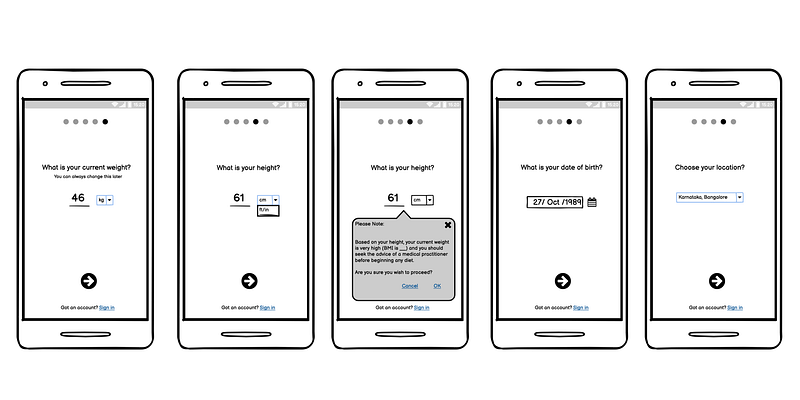
- The initial set of onboarding screens looks for user demographics to understand the individual goals, gender, frequency of workouts, weight, heights, age, etc.
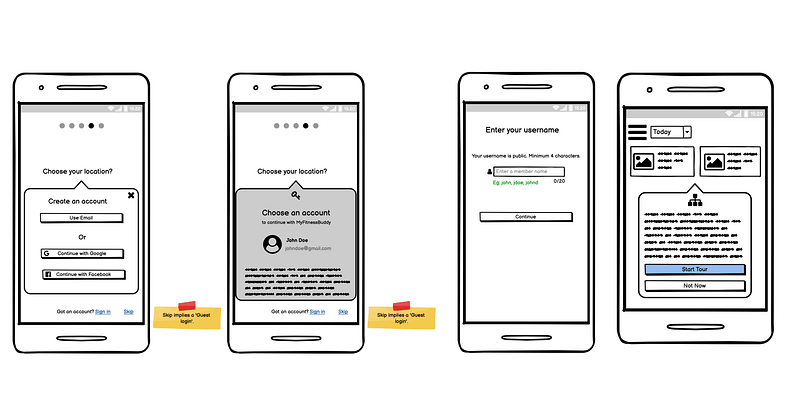
- MyFitnessBuddy can be used as a guest user & a registered user with complete access after verification of the email id.
- A unique username is suggested & then proceeding towards a quick tour of the app.
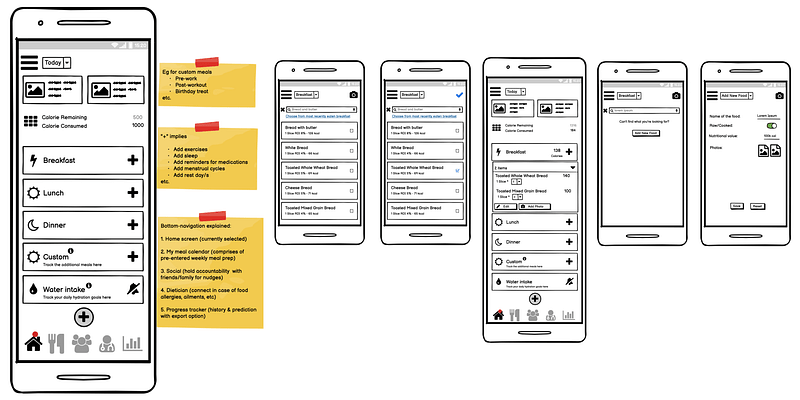
- The home screen has various prominent details:
SECTION 1
The types of healthy diets/recipes/offers etc comprise this section. Tapped on it leads to its description page.
SECTION 2
The total calorie consumption is based on the data input by the user during their onboarding based on the user demographics.
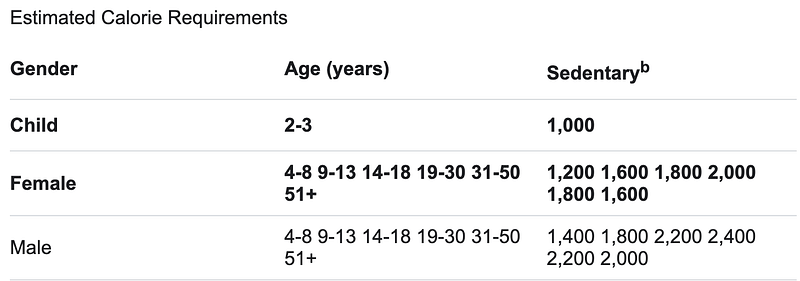
The calorie consumed is always the sum of the individual intake consumed at any given point in time.
When the exercise details, sleep hours, and water intake details are input, the calories burnt are predicted by the algorithms & calculated accordingly.
Rest days (default: Sunday) in addition can be marked manually by the user. Food allergies (known already) can be added & updated.
SECTION 3
The food intake with the quantity can be added to the respective sections like Breakfast, Lunch & Dinner.
The search for the type of food is pretty intuitive. There is also a provision for adding your unique food item if it’s not from the regular listed food menu/food database. The food database is hugely populated by nutritionists for vegetarians, vegans, keto, non-vegetarians, pescatarians, etc.
Most regular items can be fetched for optimal data entry by the user.
CRUD operations can be performed by the user along with images.
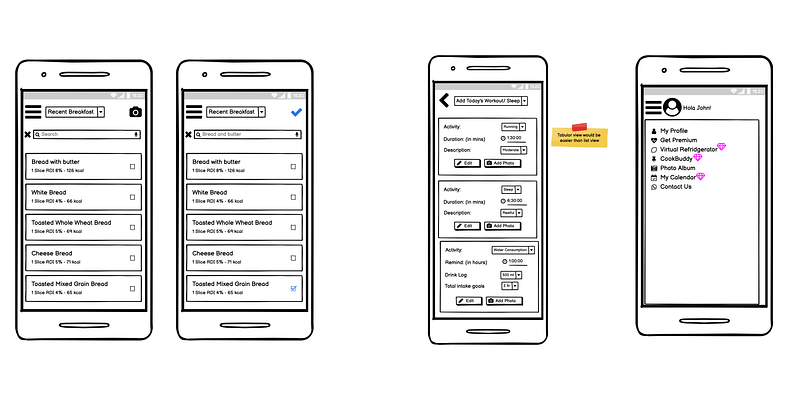
The hamburger menu lists both the premium & the non-premium menu option for the registered & the guest user.
The data is not saved for privacy concerns wrt the Guest user, yet he/she can explore the options in the app.
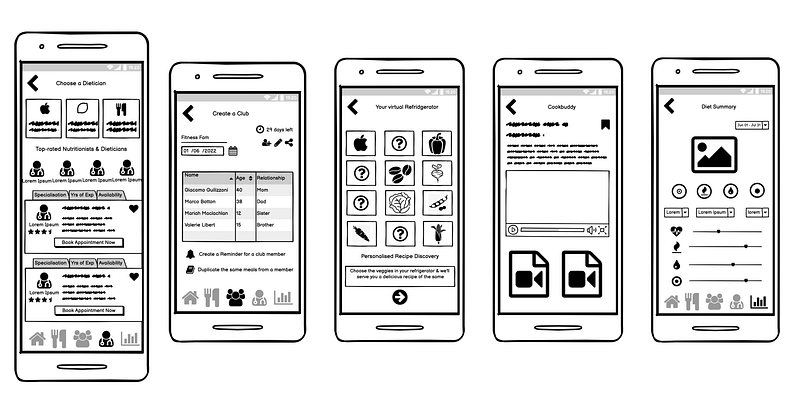
USPs (Unique Selling Proposition) of the Product —
i) Dietician/Nutrition feature in-app
ii) Club creation to add family & friends
iii) Virtual Refridgerator
iv) Cookbook for content
v) Diet Summary
Let’s explore them one by one briefly.
i) Dietician/Nutrition feature in-app
- Certain food consumption can trigger an allergic or adverse reaction for a user (Eg: Mushrooms, peanuts, hazelnuts, etc) & in case of a medical emergency, a nutritionist can be consulted.
- If a new workout regime is to be followed by the trainer, the user can consult the dietician as well on request.
ii) Club creation to add family & friends
- The club comprises a Referral program where family or friends can be added to have accountability on each other via nudge for a workout/meal etc.
- In a family since the meal consumption is almost the same, only one person can do the data entry & rest of the members’ meals are also updated thus saving time & effort.
iii) Virtual Refridgerator
This is a feature where you either enter by tapping the vegetables on the screen or by clicking a picture of the veggies residing in your vegetable drawer.
Isn’t it lovely to have a virtual assistant for meal prep?
iv) Cookbook for content
This feature suggests healthy recipes with the combination of the veggies you love without any wastage!
v) Diet Summary
This shows the overall micro & macronutrients consumed by the individual over a chosen period of time, pictorially.
Note: This is the most accurate prediction report & cannot substitute for a medical test.
Please do share your constructive feedback in the comments.
Let us know what features fascinated you & what not so that we can improvise it going ahead.
References:
Thank you for coming this far and feel free to reach out if you’d like to have conversations around products or partnerships.
Send an email to hello@prathima.me
 Prathima's Miles & Milestones
Leave a comment